


Sellvia: Manage Your Business
3.2377.00 Reviews
App Specs
- Version
- 2.0.14
- Updated On
- License
- Free
- Downloads
- 50,000+
- Developer
- Sellvia
- Categories
- Business
- Platform
- Android
Screenshots

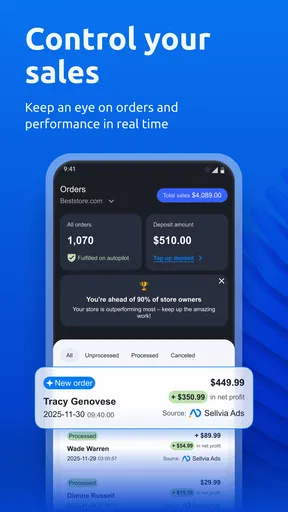
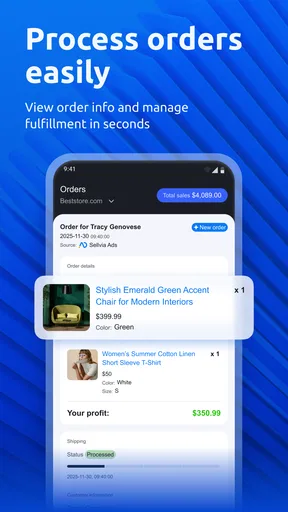
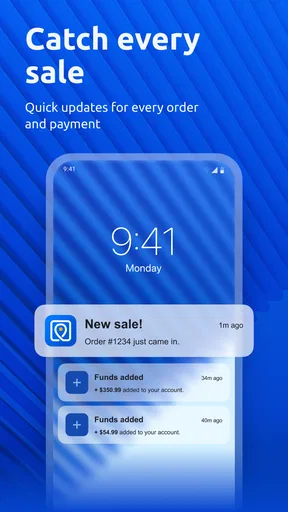


 Analysis by AppCompare
Running an online store becomes tiring when every small task demands a separate visit to a desktop dashboard. A product needs adding, an order needs checking, or a customer purchase needs attention, and suddenly a simple business update turns into a chain of interruptions. Sellvia: Manage Your Business is built around reducing that back-and-forth. I found its main appeal in keeping the essential store routine closer at hand, especially for people who do not want their business tied to a desk.
Developed by Sellvia, this free Android business app focuses on managing an online store, adding products, and processing orders. That sounds straightforward, but the value is in the workflow: instead of treating mobile access as an emergency backup, I see it as a practical companion for the moments between meetings, deliveries, errands, and other parts of the day. It is available to Everyone and supports Android 7.0 or later, which makes it accessible on a wide range of devices.
What using Sellvia feels like in real store work
When I judge a business app, I start with the moments when it touches a real store: signing in, changing a product, or checking an order. Those are the points where convenience and care need to work together. I’ll look at how to approach those tasks deliberately, so mobile access stays useful without becoming a reason to rush decisions or keep checking the store all day.
The recurring problem is not always a lack of tools
Most small shop owners already have enough tools. The real problem is that the important information is scattered across a browser, email notifications, messages, spreadsheets, and sometimes a separate shipping routine. When a customer asks whether an order has been handled, I do not want to reconstruct the answer from several places. I want to open one business-focused screen, understand what needs attention, and act without losing the thread of the day.
That is the problem this app tries to address. Its purpose is not to replace every part of running an online business. Instead, it brings the most immediate store actions into a mobile setting. For a solo seller, that distinction matters. A phone is often already nearby, while a laptop may be closed, charging, or unavailable. The app is most useful when speed and continuity matter more than deep administration.
I would especially consider it for a seller who checks orders frequently, updates a compact catalog, or handles the store personally. It can also suit someone who works from different locations and wants a direct way to stay involved without opening a full desktop workspace. The experience feels more focused than a general browser session because the reason for opening it is clear: check the store, update products, or move orders forward.
A first setup should be treated as a workflow test
My advice is to begin with a small, controlled task rather than trying to reorganize the whole store immediately. Add or review one product, then inspect an existing order and notice how naturally the information is presented. This first pass tells you whether the mobile layout matches the way you think about your business. If you prefer checking a few urgent items at a time, the app’s approach makes sense. If you need broad catalog editing, detailed reporting, or complex configuration, you may still prefer the usual desktop route.
Worth Reading Before You Choose

Flipboard Shows What News Apps Must Do Beyond the Feed

Switching to Android Auto Means Rethinking Your Driving Routine

Google Calendar Makes a Crowded Week Easier to Manage

Ludo King Makes the Most of the Minutes Between Plans

Baby Panda World Brings Quick Play to Modern Phones, but Its Game Library Feels Busy

ESPN’s Live Game View Makes Following Close Games Easier
The first useful setup is also a good moment to decide what belongs on mobile. I would use the app for actions that benefit from immediacy: checking new purchases, confirming what needs processing, and making focused product changes. I would leave long descriptions, extensive catalog cleanup, and any task that requires comparing many records to a larger screen when possible. This division prevents the phone from becoming a cramped replacement for a full business workstation.
Because the app is free, trying this split carries little commitment. That does not mean every seller will find it equally valuable. Free access removes a financial barrier, but the real question is whether the mobile workflow saves enough attention to justify adding another business app to your routine. In my view, it does when your store receives regular activity and you are often away from your computer.
Product work is easier when changes are deliberate
Adding products from a phone can be convenient, but it also creates a temptation to rush. A small screen encourages quick entry, and quick entry can lead to inconsistent names, incomplete descriptions, or images being handled without the same care you would give them at a desk. I would use the app to make a product available when timing matters, then return later for a more careful content review if the item is important to the catalog.
A useful habit is to prepare the product information before opening the app. Keep the title, essential details, and any inventory notes together so you are not switching between several places while entering them. This reduces the chance of publishing a half-finished item simply because you are working from a phone. The app can shorten the path from idea to listing, but preparation still determines the quality of the result.
There is also a practical trade-off between speed and consistency. A seller with a small selection may find mobile product management comfortable because each item receives individual attention. A larger catalog is different. Repeating the same operation many times on a phone can become tiring, and the desktop experience is usually better for comparing items side by side. Sellvia’s mobile role is strongest as a responsive editing tool, not necessarily as the only place for major catalog projects.
Orders turn the app into a daily check-in
Orders are where mobile access can have the clearest effect. Imagine a normal day: you are away from your desk when a purchase arrives, then later you have a short break before another appointment. Rather than waiting until evening to open the store, you can check the order while the details are fresh, understand what requires processing, and keep the business moving. That does not eliminate fulfillment work, but it can reduce the delay between receiving an order and acknowledging it.
I would use a simple rhythm: check orders at natural transition points, process what is ready, and avoid repeatedly reopening the app without a reason. This turns the phone into a controlled checkpoint instead of a constant distraction. For a solo operator, that distinction is important because business notifications can easily take over the day.
The app is also useful when an order question interrupts another task. A customer may ask whether their purchase has been seen, or you may need to verify what was submitted before arranging the next step. Having store information available in a focused mobile environment is more practical than relying on memory or postponing every answer until you reach a computer.
Small checks can prevent larger interruptions
One non-obvious benefit of a mobile store tool is not the dramatic task it completes, but the small uncertainty it removes. I can check whether an item was added correctly, confirm that an order is visible, or review the next action before moving on. These checks are easy to postpone when the only alternative is a full desktop session. Once postponed, they tend to gather into a stressful block of work.
My preferred approach would be to use Sellvia as a short inspection layer. Open it with one question in mind, answer that question, complete the action if it is clear, and close it. This sounds minor, but it is a meaningful workflow improvement for people who manage a store alongside another job or family responsibilities. The app earns its place when it helps prevent a collection of five-minute tasks from becoming an evening project.
Where the friction is genuinely reduced
The biggest reduction in friction comes from context. A general browser can technically reach many store functions, but it also brings tabs, page scaling, login interruptions, and the temptation to wander into unrelated work. A dedicated business app gives the task a clearer boundary. I am opening it because I need to manage the store, not because I am browsing the web.
That focus matters when attention is limited. The shorter path from checking the store to acting on it can make routine work feel less heavy. It is particularly helpful for urgent but simple actions that do not deserve a full workstation session. In that role, the app feels more useful than a desktop-only arrangement and more purposeful than trying to manage everything through a mobile browser.
Another advantage is continuity. A store owner may work from home in the morning, travel during the afternoon, and handle customer-related tasks later in the day. Mobile access makes the business less dependent on one physical location. I would not describe that as complete freedom from a computer, but it does make the store easier to keep within reach.
How it compares with the usual alternatives
The most obvious alternative is using the store through a mobile browser. A browser may be preferable when you need a broad administrative view, multiple tabs, or features that are not part of the app’s focused workflow. It can also be more comfortable for research and comparison. Sellvia’s advantage is convenience: the dedicated app is better suited to quick store checks and direct actions than to a wide, multi-window session.
A desktop dashboard remains the stronger choice for detailed work. If I were restructuring a large product range, comparing many entries, or handling a long administrative session, I would want a larger display and a keyboard. The phone is excellent for responsiveness, but it is not automatically better for precision. Choosing the app does not mean abandoning the desktop; it means assigning each device the work it handles best.
Another alternative is managing orders through email notifications or messages. Those channels can alert you, but they rarely provide the same store-centered context as opening a business management tool. An email may tell you that something happened, while the app is intended to help you inspect the store and continue with the relevant action. For that reason, I would rather use messages as prompts and the app as the place where I verify and manage the business task.
What I would watch before relying on it heavily
The average rating is 3.2 from around 700 ratings, with hundreds of written reviews, so I would approach the app with realistic expectations rather than assuming every seller will have a seamless experience. Those figures do not tell me which individual issue affected each person, but they do suggest that the mobile experience deserves a personal trial before becoming the only way you manage a store.
My main concern is dependence on a smaller interface for tasks that naturally need more space. Product management can be quick until the work becomes repetitive. Order processing can be convenient until you need to cross-check several details at once. In both cases, the app may reduce friction for individual actions while adding friction to larger batches. That is not a contradiction; it is the normal trade-off between mobility and workspace.
I would also avoid treating a mobile app as a substitute for a clear operating routine. The tool can help you access store work, but it cannot decide which orders should be handled first, how product information should be standardized, or when you should stop checking the business. Sellers who want a fully automated operation may find that this kind of app does not remove enough manual responsibility.
Who should use it, and who should skip it
I think Sellvia is a good match for independent sellers who want a direct mobile connection to their online store. It makes the most sense if you regularly add products, monitor incoming orders, or need to handle store tasks while away from a computer. It is also a sensible option for someone starting with a modest catalog and looking for a free way to keep basic business activity close at hand.
I would be more cautious if your work depends on large-scale catalog editing, intensive reporting, or long sessions of detailed administration. In that situation, a desktop dashboard or browser-based workflow will probably feel more capable and less tiring. I would also skip it as a primary tool if your store is so busy that you need a more comprehensive operations system rather than a focused mobile companion.
The current release is version 2.0.14, and the app supports Android 7.0 and newer. That broad compatibility is helpful for sellers using older phones, although I would still judge the experience on the device you actually plan to use. A business tool needs to be comfortable during repeated short sessions, not merely installable.
My final view after weighing the trade-offs
Sellvia: Manage Your Business solves a specific and recurring problem: it makes basic online-store work available when a computer is inconvenient. I like it most as a focused companion for checking orders, adding products, and handling small but important updates before they become a backlog. Its value comes from time saved and interruptions avoided, not from pretending that every business task belongs on a phone.
The app is free, rated for Everyone, and has passed the point of being an obscure experiment, with over 50 thousand installs. That reach makes it easy to consider, but the mixed average rating is a reminder to test the workflow yourself. I would start with one product update and one order check, then decide whether the app genuinely makes your day easier.
My recommendation is positive for mobile-first sellers and cautious for larger operations. Use it for quick, purposeful store management, keep a desktop workflow for complex work, and prepare product information before entering it on a small screen. With that division of labor, Sellvia can remove a surprising amount of everyday friction. Without it, the app may feel like another place to repeat tasks you already handle elsewhere.
Pros
- Simple tools for managing products
- orders
- and store activity
- Useful automation can reduce repetitive e-commerce tasks
- Helps organize supplier and product information in one place
- Suitable for beginners building their first online store
- Mobile access makes it easier to monitor business activity anywhere
Cons
- Some features may require a paid Sellvia plan or additional fees
- Advanced customization options can feel limited for experienced sellers
- Supplier availability and shipping times may vary by destination
- Managing larger catalogs may become less convenient on a phone
- A stable internet connection is needed for most business functions
FAQs for Sellvia: Manage Your Business
What is Sellvia: Manage Your Business used for?
Sellvia: Manage Your Business is designed to help online sellers organize and manage their e-commerce operations from a mobile device. Depending on your Sellvia account and plan, you can use it to review products, monitor orders, follow business activity, and keep track of important store information without relying entirely on a desktop browser. It is mainly intended for existing Sellvia users rather than casual shoppers.
Do I need a Sellvia account to use the app?
Yes, the app is primarily connected to the Sellvia e-commerce platform, so you will generally need an active Sellvia account and valid login details to access its business features. The available tools may depend on your subscription, store setup, and permissions. If you are only researching dropshipping or online selling, you may find that the app offers limited value until you create and configure a Sellvia account.
Can I manage my entire online store from Sellvia’s mobile app?
The app can be useful for checking and managing essential business information while you are away from your computer, but it should not necessarily be treated as a complete replacement for the web dashboard. Advanced configuration, detailed store customization, marketing settings, integrations, and some product or order-management tasks may still be easier or available only through the full Sellvia platform. Its strongest advantage is convenient mobile access to routine operations.
Is Sellvia: Manage Your Business free to download and use?
Downloading the application may be free, but access to Sellvia’s business services can depend on a paid subscription, account plan, or other commercial terms. The app itself does not automatically mean that product sourcing, store creation, fulfillment, or related services are free. Before subscribing, review the current pricing, trial conditions, renewal policy, and included features so you understand the total cost of operating your store.
Is the Sellvia app suitable for beginners in dropshipping?
Sellvia: Manage Your Business may be helpful for beginners who want a structured platform for handling products and store operations, especially if they appreciate having business information available on mobile. However, the app cannot replace knowledge of product research, advertising, customer support, taxes, refunds, and e-commerce regulations. New users should explore the platform carefully, read its documentation, and test the workflow before committing significant money to a store.


